

Table of Contents:
What is Homes & Villas by Marriott?
Global information on rules and requirements
FAQ - Frequently Asked Questions
What is Homes & Villas by Marriott? 🏡
Homes & Villas by Marriott Bonvoy is a global home rental platform launched in 2019, bringing Marriott International’s hospitality expertise into the vacation rental market. It focuses on premium and luxury homes and partners only with select professional property managers to meet Marriott Bonvoy’s high standards.
All homes are professionally managed and carefully vetted to ensure a reliable guest experience, including clean properties, 24/7 local support, high-speed Wi-Fi, premium linens, and quality amenities.
Today, the collection includes over 180,000 homes in 80+ countries and 10,000+ cities worldwide.
Marriott Bonvoy members can earn and redeem points on stays, and property managers gain exposure to more than 260 million Marriott Bonvoy members globally
Important: Homes & Villas by Marriott Bonvoy is a premium distribution partner focused on high-end and luxury rentals. They apply their own internal selection and prioritization criteria (portfolio, quality standards, and geographic focus) when deciding which properties and locations they onboard.
ℹ️ While we actively promote this partnership, acceptance is not guaranteed. Final validation and onboarding decisions remain entirely at the partner’s discretion.
Minimum requirements ✅
- Be on instant booking
- Have the G card (Marriott does not allow you to apply an IBAN per property)
Announcements must include:
- A cancellation policy (to be defined via Smily's Marriott app)
- Arrival and departure times
- Unique name of the property (between 8 and 255 characters)
- Announcement ID and HMC ID (provided by Homes & Villas by Marriott Bonvoy Integration Team)
- Exact address of the property
- Property description in English only
- You can enter it in Smily PMS > base > description > language 'en'
- Or in the Marriott app > preferences > override description > EN
- Minimum 1 bedroom (no studio or shared accommodation)
- Fully equipped kitchen
- No kitchenette – real kitchen required
- Minimum 6 photos (resolution 500x800, 20 recommended)
- Minimum 5 pieces of equipment
- Availability of at least 3 consecutive days in the next 365 days
Quality criteria:
- Basic standards respected
- Wi-Fi required
- Flat screen required
- 24/7 Support
- Safety equipment: smoke/CO2 detectors, fire extinguishers, first aid kit
- Supply of shampoo, shower gel, soap, towels, linen (if permitted)
- Property in good condition
- Furniture quality assessed by the Marriott team
Cost and commission 💰
- Marriott charges a 15% commission on each reservation (automatic collection).
- +2% for payment management
- Smily applies an additional 1.9% commission (excluding VAT), billed monthly in addition to the chosen pricing plan.
- it will be billed to you, based on the reservation checkout’ date.
- it is calculated based on the final price.
- you can compensate and add it to your Marriott Markup via the app preferences.
How do I log in to Marriott? 🔌
a/ First time logging into Marriott?
- Complete the partnership form
- Waiting for a response (24-48 hours)
- Marriott Property Review
- Introductory call
- HMC ID Assignment
-
Install the Marriott app from the Smily app center
- Allow access to information management
-
Accept the additional commission
-
Submit HMC ID
-
Define cancellation policy + security deposit (if desired)
- Select the ads to publish
- Here we go!!
b/ Already connected via another Channel Manager?
→ Migration to Smily:
- Homes & Villas by Marriott Bonvoy does not allow existing ads to be linked to Smily. This is a new post.
- Existing future bookings will continue to be managed through the legacy Channel Manager.
- Do not disconnect the old CM
- Contact hvmbinventory@marriott.com (USA/Canada) or intl.HVMB.inventory.support@marriott.com to obtain the new HMC ID
- Connect properties via Smily with the new HMC ID
- Homes & Villas by Marriott Bonvoy will do a test booking
- Once validated, Homes & Villas by Marriott Bonvoy will deactivate the announcements from the old CM
Global information on rules and requirements 📜
Prices and availability
- Marriott accepts daily and LOS (Length of Stay) rates
- ⚠️ Smily only supports LOS at the moment
Minimum and maximum stay
- Minimum stay required: at least 3 nights but don't change anything on Smily, Marriott takes care of it and you have the right to connect properties that have a minimum of one night;
-
Maximum stay : 30 days for the moment;
- We will work in the future to increase this according to your needs.
Occupancy-based pricing
- Smily sends the best rate based on check-in date, length of stay based on your rates and LOS.
Discounts
- Included in the LOS transmitted to Marriott but will not be highlighted in the price breakdown.
Taxes
Tax application is partially supported :
- Taxes applied to rent are sent as real taxes
- Taxes applied to fees are included in the final fee amount
→ See the tax correspondence table between Smily and Marriott (e.g. city tax, VAT, etc.)
Costs
→ Any fee can be applied either per night or per stay only!
- Percentages per adult are not supported → to be collected manually
- Fees per child are not covered → to be collected manually
| Smiley Fees | Marriott Fees |
|---|---|
| municipality, visa_support | ADMINISTRATIVE_FEE |
| cleaning, housekeeping, final_cleaning | CLEANING_FEE |
| parking | PARKING_FEE |
| resort, water_park, club_card, service_charge, credit_card | RESORT_FEE |
| damage_deposit | SECURITY_DEPOSIT_FEE |
| heating, electricity, internet. gas, air_conditioning, water_usage, oil | UTILITY_FEE |
| airport_shuttle, linen_package, bed_linen, kitchen_linen, conservation, destination, environment, heritage_charge, shuttle_boat. sea_plane, public_transit_day_ticket, ski_pass, transfer, towel_charge, wood, wristband, other | MISCELLANEOUS_FEE |
| pet_fee | PET_FEE |
| tourism, government, residential, sauna_fitness_facilities | OCCUPANCY_TAX |
| value_added, goods_and_services, harmonized_sales. provincial_sales | VAT_TAX |
| city_tax, city, spa, hot_spring, local_council | CITY_TAX |
- Collection Type : We currently only cover charges per night or per stay .
- Time of Collection : Time of collection is not supported . All charges are sent as collected at the time of booking .
-
Pet fees are synced with Homes & Villas by Marriott Bonvoy using the following calculation types:
- You must check the animal equipment considered in Smily.
- The guest will be able to see the pet fee when booking only if the pet equipment considered is selected in Smily .
- By default, the number of pets included is 1 on the Homes & Villas by Marriott Bonvoy site. Guests are encouraged to contact the manager if they wish to bring more than one pet.
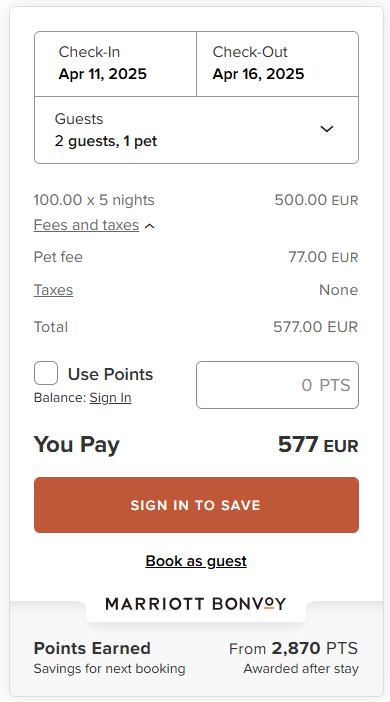
Types of possible collection methods for animal expenses:
- Amount per stay
- Amount per night
- Percentage
Regardless of whether you have specified collection at booking or arrival , the pet fee will always be synced as collected at the time of booking .
Security deposit 🛡️
There are 2 ways to handle it;
1/ Via Marriott
You can enable this through the Marriott app on Smily
- If enabled, the customer will pay the security deposit upon booking
- Optional or mandatory, always refundable after inspection
- Not included in Marriott commission
In case of damage, you will have 72 hours after checkout to contact Marriott and report the damage.
2/ Outside of Marriott
If you leave the option disabled on the app,
- We will use the value (if any) configured on our PMS to add a note in the property description on Marriott to inform travelers that this will need to be paid later.
Cancellation Policy ❌
Choose from the Marriott app:
- 14, 30, 60 or 90 days with grace period
Reservation processing
- Instant booking model only
- No “request to book”
- Manual bookings in Smily automatically block availability
Details sent to Homes & Villas by Marriott Bonvoy:
- Guest information, dates, prices, pets, cancellation policy
Modification / cancellation:
- Edit: Not supported on the Homes & Villas site, so not possible via Smily either .
- Cancellation: Customer cancellations via Marriott are transmitted to Smily in real time
- To cancel on the manager side, do it from Smily
Enabling/Disabling Properties
- Use the “Disconnect” action from the dedicated app
→ Feature under construction;
Items visible on the guest invoice
- Accommodation price: total net (excluding Marriott promo)
- Reservation taxes: sum of accommodation taxes + fees
- Service Fee: Synchronized Additional Fee
- Marriott Commission: shown as negative
- Total: net amount paid
How often is my data synced?
- Availability → within 5 minutes of modification + every hour
- Rates → within 10 minutes of change + every 12 hours
- Fees → within 5 minutes of change + every 12 hours
-
Content / Policies → within 5 minutes of modification + every 24 hours
What data is synchronized between Homes & Villas by Marriott Bonvoy and Smily, and where to manage it? 🔄
Data mapping and synchronization:
Ad Configuration
| Action | Where to manage it? |
|---|---|
| Get your Homes & Villas by Marriott Bonvoy ID | With the Marriott team |
| Create new ads | In Smily |
| Edit ads | In Smily |
| ⚠️ Updates made while the ad is waiting for connection will not be synchronized. |
|
| Smily pushes updates to Marriott within 24 hours of check-in. It is recommended to allow one day for changes to be reflected. |
|
Announcement details
| Action | Where to manage it? |
|---|---|
| Manage the property's equipment | In Smily – See the list of synchronized equipment → |
Calendar and availability
| Action | Where to manage it? |
|---|---|
| Manage calendar and availability | In Smily |
Booking Policies
| Action | Where to manage it? |
|---|---|
| Manage instant bookings | In Smily |
| Manage cancellation policies | In the dedicated Marriott app on Smily |
| (14, 30, 60 days to choose from – the 90-day policy is reserved for exceptional cases) |
|
| Set arrival/departure times | In Smily → PMS > Location |
Finance and Revenue Management
| Action | Where to manage it? |
|---|---|
| Manage markups/discounts | In the Marriott app on Smily |
| Manage payments | In Homes & Villas by Marriott Bonvoy |
| Modify customer invoice | In Homes & Villas by Marriott Bonvoy |
| Manage discounts | In Homes & Villas by Marriott Bonvoy |
| Manage promotions | In Homes & Villas by Marriott Bonvoy (seasonal activation via Marriott dashboard) |
Communication with guests
| Action | Where to manage it? |
|---|---|
| Cancel a reservation | Directly in Smily |
| (If not possible, then via Marriott and update the “Offline Booking Smartsheet”) |
|
| Manage guest communication | Messages initiated on Homes & Villas by Marriott Bonvoy are not synchronized . |
| But messages sent from Smily are forwarded to guests via private email. |
|
| Manage customer reviews | No customer reviews on Marriott |
Property Type Mapping
| Smily type | Marriott Type |
|---|---|
apartment |
apt |
country house |
house |
bed and breakfast |
house |
bungalow |
bungalow |
cabin |
cabin |
castle, cave, island, mill, etc. |
house |
cottage |
cabin |
condominium |
condo |
cottage |
cottage |
house, villa, manor, etc. |
house |
loft |
loft |
townhouse |
townhouse |
yurt |
house |
Mapping bed types
Known limitations 🚧
- Long stays (>30 days) not supported at launch
- No multi-units possible
- No specific configuration for children
- “Request to book” template not compatible
- Fee only per night or per stay
FAQ - Frequently Asked Questions ❓
-
I don't have a Marriott HMC ID. What should I do?
Follow the steps outlined above in the login section.
First time logging into Marriott?
-
How do I manage guest messages?
Marriott doesn't offer a messaging API → everything goes through direct email.
-
How to migrate from another Channel Manager?
See the full procedure in the corresponding section above:
Already connected via another Channel Manager?
-
Which cancellation policies are available?
- 14 days (with grace period)
- 30 days
- 60 days
- 90 days (exceptional cases)
To be defined directly in the Marriott app on Smily.
-
How do I manage my security deposit?
From the Marriott app on Smily:
If enabled: Marriott collects the deposit (card), refunds, or pays in case of damages.
If disabled: A message is added to the house rules to inform you that the deposit will be collected directly by the property manager.
-
Can I offer instant booking and request to book?
No. Only instant booking is supported.
-
Who processes payments?
Marriott is the sole merchant entity (card collection with a 2% additional fee).
-
How is the tourist tax managed?
Marriott collects and pays it (commission-free). If the property manager collects it, it must be mentioned in the accommodation rules.
-
When does Marriott release the funds to me?
After the free cancellation period. Payment before guest arrival. By bank transfer (IBAN required)
⚠️ Stripe not used.
-
Can I activate promotions from Smily?
No, only through the Marriott dashboard.
-
Does Marriott support both nightly and LOS rates?
Yes. ⚠️ But Smily only supports LOS at launch.
-
INVALID_REQUEST error message?
Check that:
- A room and a bed are defined
- License number provided
- Name, description completed
- Minimum 6 photos
- Minimum5 amenities
-
How do I cancel a reservation?
Do it directly from Smily, it will be automatically sync with Marriott.
-
Is acceptance guaranteed once I connect/apply to Homes & Villas by Marriott Bonvoy?
No. This channels is selective, opportunity-based partnership. They review and approve properties based on their internal criteria and current priorities (including quality standards, portfolio fit, and geographic focus).
How to contact Marriott Homes & Villas? 📨
If you are already online at Marriott:
| Subject | Contact email |
|---|---|
| Listing and inventory management | |
| Payments & Reconciliations |
Comments
0 comments
Please sign in to leave a comment.