

On our way to synchronize more and more with our partner Airbnb, we are now presenting the availabilities of categories of guests that can make instant booking requests.
Request to Book - Instant Book Categories
How does it work?
If the “instantly bookable once published” is selected --> PM needs to check which category of guests can book online, note that is already available on Airbnb Official synchronization:

The available categories are:
No one
Everyone
Experienced
Government ID
Experienced guest with government ID

If the “instantly bookable once published” is not selected --> Request to book on Airbnb Official Synchronisation (Full synchronization only - If you use the limited synchronization, Request to book is not available):
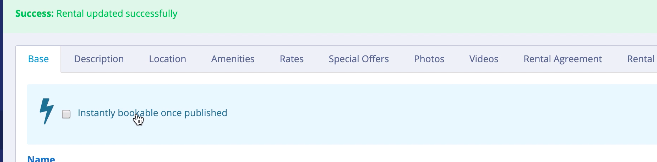
The following warning will appear under Change Settings on the Airbnb app:
Warning! The rental is not currently instantly bookable. To access the setting, please select "instantly bookable" in the rental section.

The following categories are only available for selection:
Government ID
No one
Note : the allowed guest category works as an exclusion list from the Request To Book feature. If you select "Government ID", it means that you allow such guests category to instantly book anyway ! If you don't want Instant Bookings at all, you should select "No one" category.
Instant Book behavior for API-connected Airbnb listings
As per Airbnb’s listing policies, when a listing is connected via API, Airbnb automatically enables Instant Book by default.
However, depending on your access level, your Partner Manager may allow you to configure additional rules using the instant_booking_allowed_category parameter. This parameter lets you define which types of guests are allowed to use Instant Book (for example, all guests or only certain guest categories).
Important note on limited sync
If your account is on limited sync, Instant Book settings are not fully controlled through the API.
In this case:
Changes made in the system may not override Airbnb settings
You must manage Instant Book directly in Airbnb if you want to disable it
👉 Therefore, if Instant Book needs to be turned off, it should be done manually in the Airbnb dashboard.
Comments
0 comments
Please sign in to leave a comment.